How to Use a Cable Tester (and Read What It Tells You)
A cable tester is one of the few tools that works the same whether it costs $10 or $300: both ends in, watch the sequence, read the order. This page walks the steps and - more usefully - what each possible readout means for the cable in your hand.
The universal steps
- Disconnect both ends. Never run a basic tester into a live switch port - POE power kills cheap testers. Unplug from the device and the wall/port first.
- Main unit one end, remote the other. The remote exists so the whole cable - both conductors of every pair - sits in the measured circuit.
- Power on and read the sequence. Auto mode cycles pins 1-8; slow mode lets you watch each pin. Order and pairing are the message.
- Decode against the table below - and re-test after every fix, because the second-most-common fault is the one introduced while fixing the first.
Every readout, decoded
| What you see | What it means | The fix |
|---|---|---|
| 1-8 in order, both ends | Pass - wiring is correct | If the network still fails, the cable is not the suspect |
| A number never lights | Open - a conductor is cut or not making contact | Re-terminate both ends first; patch cables, replace |
| Two numbers light together | Short - two conductors touch | Find the pinch/cut; usually a re-crimp |
| Numbers out of order | Crossed pair - two conductors swapped | Re-terminate the wrong end against T568B |
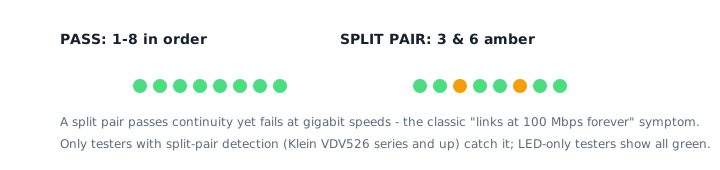
| All green but gigabit will not negotiate | Suspect a split pair - invisible to LED testers | Test with split-pair detection (NF-8209 tier) or replace |
The two upgrades that change what "using a tester" means
Length measurement (NF-8209 tier upward) turns "pin 5 open somewhere" into "pin 5 opens 38 meters down the run" - which is the difference between re-terminating both ends and opening one ceiling tile. It works by timing a pulse down the pair; accuracy depends on the nominal velocity of the cable brand, so treat readings as a very good estimate rather than a ruler.
POE detection answers the power half of the network: standard (802.3af/at/bt) or passive, which pairs, and whether the port is live at all. For camera and access-point work this is the single most-used feature after wiremap - the full scenario breakdown is in the network tester guide.
Frequently asked questions
How do I use a two-part cable tester?
Plug the main unit into one end and the remote into the other, set both to the same mode (usually "on" or "slow"), and watch the LED sequence. The numbered LEDs map to pins: in-order 1-8 is a pass on a straight-through cable.
What does it mean when only some LEDs light?
LEDs 1-4 lighting but 5-8 not means an open in one conductor (or more) - commonly the brown pair damaged by a staple or a bend. If the sequence starts skipping numbers, two conductors are crossed. No LEDs at all usually means the cable or a termination is fully dead.
Why does my cable pass the tester but fail in use?
Three usual suspects: a split pair (passes continuity, fails gigabit - needs split-pair detection to see), a length or interference problem the tester cannot model, or the fault is not the cable at all - check the port, the device and the VLAN before re-crimping anything.
Can I test a cable already plugged into a switch?
Never test a live network port with a basic tester - the POE power can damage it. Disconnect both ends first, or use a tester explicitly rated for live/POE protection (and still follow its manual).
How long does a test take?
A wiremap pass takes seconds - the auto scan cycles once through eight pins. Length and POE tests take longer on prosumer units (10-30 seconds); a full professional link report with cloud upload is a minute or two.